



포스트백 연동만 하고 나머지는 매체에서 수동으로 광고 세팅해서 진행하는 방식
Fukuroulabo 가 현재 S2S 연동되어 있음
S2S는 캠페인 on/off를 매체가 알지 못하므로 이에 대한 사인을 운영자에게 줘야함(그린피는 캠페인 off 했는데 매체에서는 끄지 않아 클릭 발생하는 경우 있음)
STEP 1. 사전 정보 조사
•
매체사 개발 환경 설문조사 실시
- 매체사 <> 그린피 연동 설문지 바로가기
STEP 2. 포스트백 연동 가이드, appcode 전달
•
포스트백 연동 가이드
III-IV Publisher Callback Setup Guide
Step 1. Log in to an Greenp Publisher Admin page.
Step 2. Please set the callback integration information displayed on the dashboard (main page).
Division | Desc | Necessary or not | |
Method Type | Get of Post | Necessary | |
Data Type | Basic or JSON | Necessary | |
Postback URL | Enter the publisher's postback URL | Necessary | |
Fixed Parameter | Matching values that can be fixed upon postback | Option | |
Postback Parameter | Size | Desc | Type |
ads_idx | 10 | Campaign key | Int |
ads_name | 255 | Campaign name | String |
appcode | 10 | Issued publisher key (publisher code) value | String |
app_uid | 255 | User identification value of the publisher sent when participating | String |
adid or idfa | 50 | adid for android / idfa for iPhone | String |
gp_key | Up to 255 | Key values about conversion | String |
rwd_cost | 10 | Publisher | Int |
ptn_cost | 10 | Campaign PO | Int |
ads_re_participate | 1 | possible to reparticipate the campaign
(y: yes / n: no) | String |
rwd_date | participation completion time
(YYYY-MM-DD 00:00:00) | Date | |
etc | No limit | Additional information for publisher (ex. publisher uniq click_id) |
•
* Most publisher setting the postback like this.
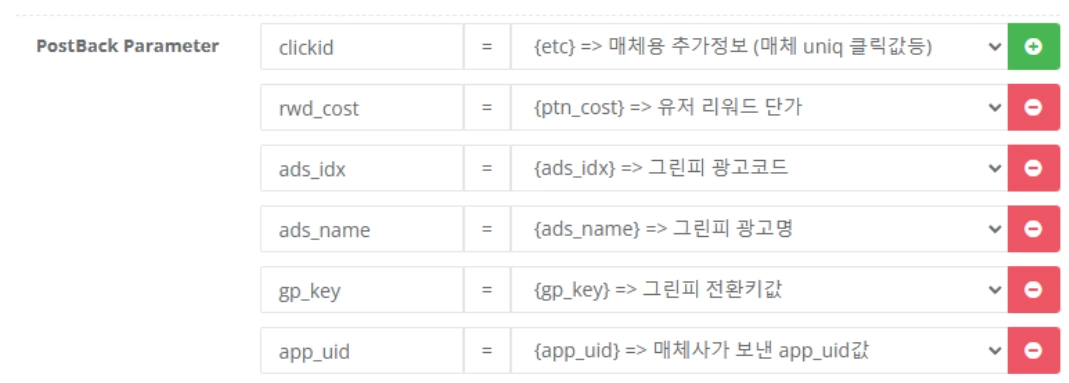
STEP 3. 확인 필요 사항
1.
포스트백 정보 기재했는지
2.
클릭 시 ADID/IDFA, appuid 정상적으로 매칭해서 주는지
STEP 4. 전환 테스트 진행
•
테스트 캠페인 생성 + 링크 전달드리기
◦
▪
ads_idx(캠페인 키), appcode 맞춰서 수정해서 드리기
STEP 5. 실제 라이브
•
전환 테스트 완료 시 실제 라이브 요청 캠페인은 아래와 같이 드리기
[부킹 요청 캠페인 정보]
•
캠페인명 : 아스달 연대기 (사전예약)
•
캠페인키 : 334244
•
단가 : 218원
•
참여 방법: 해당 페이지 랜딩하여 사전 예약 완료 시 (핸드폰 인증 단계 없음)
•
비고: KR 대상 캠페인이며 푸시하여 진행 부탁드립니다.